
- What is Canva for Non-Profits?
- 8 Key Features of Canva for Non-Profits
- Eligibility for Canva for Non-Profits
- Impact of Canva on Non-Profit Organizations
- How to Get Started with Canva for Non-Profits?
- FAQs about Canva for Non-Profits
- Is Canva really free for non-profits?
- Can volunteers of a non-profit use Canva for Non-Profit?
- Does Canva for Non-Profits include customer support?
- Are there any limitations on the number of designs or downloads for non-profits?
- How can non-profits ensure they use Canva effectively?
- What happens if a non-profit’s Canva application is not approved?
- Can a non-profit use Canva to create merchandise to sell?
- How does Canva ensure that only eligible non-profits get access to Canva?
- Can international non-profits apply for Canva Pro?
- What types of non-profit organizations typically qualify for Canva?
- Conclusion

In an ever-evolving digital landscape, non-profit/non-governmental organizations are constantly seeking innovative ways to communicate their message, engage with supporters, and drive social impact. Canva has become an indispensable resource for non-profits seeking to produce high-quality graphics without the need for expert design skills. In this blog post, we’ll dive deep into Canva for Non-Profits, discussing its features, eligibility criteria, and the advantages it offers to organizations trying to spread their message.
What is Canva for Non-Profits?
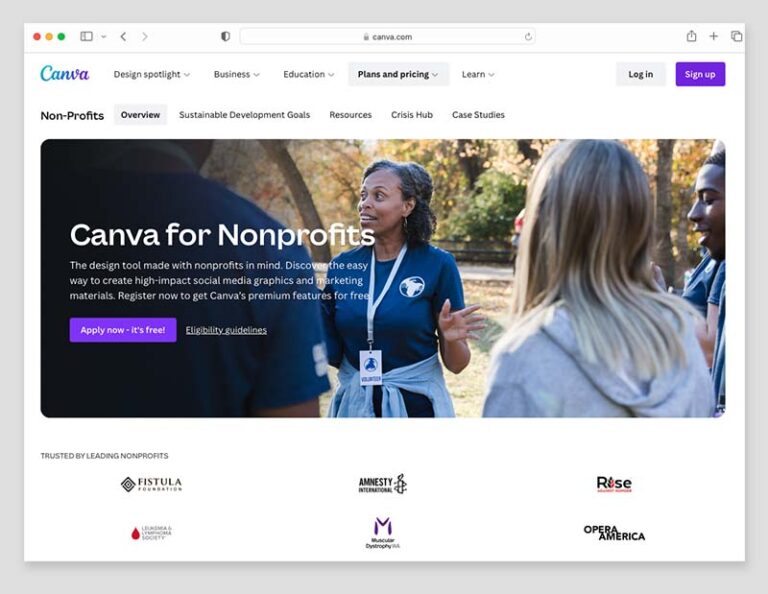
Canva for Non-Profits provides access to premium features for free to all eligible organizations that are officially registered as a nonprofit or charity in their home country. Canva for Non-Profits empowers your organization to create visually stunning content with ease, ensuring your message not only reaches but resonates with a wider audience. With its remarkable background remover, you can effortlessly produce sleek, professional images that make your campaigns stand out. Imagine crafting everything from engaging presentations to eye-catching posters, informative flyers, memorable logos, and vibrant social media posts—all with a few clicks.
Canva streamlines the design process, allowing you to generate comprehensive reports that tell the story of your impact with clarity and emotion. Additionally you get access to a vast library of stock photos, videos, and audio tracks at your disposal, the possibilities for creativity are endless. Embrace Canva for Non-Profits and watch as your visual content takes your organization’s branding and advocacy to new heights.
8 Key Features of Canva for Non-Profits
- Brand Kits: Maintain brand consistency with customizable brand kits that allow you to save your non-profit’s logos, color palettes, and fonts for easy access and application across all designs.
- Magic Resize: Instantly resize your designs for any platform or purpose without needing to start from scratch, saving time and ensuring your content is always perfectly formatted.
- Premium Templates and Elements: Access a vast library of premium templates, images, icons, and fonts that can help your non-profit’s content stand out and capture your audience’s attention.
- Background Remover: Effortlessly remove image backgrounds to create professional-looking graphics, perfect for showcasing your non-profit’s work and beneficiaries.
- Social Media Scheduling: Plan and schedule your social media content directly within Canva, streamlining your content management process.
- Unlimited Folders and Storage: Organize your designs and assets with unlimited folders and enjoy the convenience of cloud storage for all your creative work.
- Team Collaboration: Work collaboratively with your team in real-time, provide feedback, and manage team access to designs and files.
- Animations and GIFs: Bring your content to life with animations and GIFs, making your social media posts, presentations, and other materials more engaging.
Eligibility for Canva for Non-Profits
To access Canva for Non-Profits for free, non-profit organizations typically need to meet the following criteria:
- Qualification: Organizations must be recognized as charitable, non-profit, or non-governmental entities in their respective countries.
- Verification: Non-profits may need to provide documentation proving their status, such as being registered as a (i) Registered Section 18A Non-Profit Organisation, (ii) Public Benefit Organisation, (iii) Nonprofit Organisation, (iv) Nonprofit Company operating on a non-profit basis for the public benefit, (v) Nonprofit Trust or equivalent in other countries.
- Canva’s Non-Profit Program: Organizations should apply through Canva’s Non-Profit Program, which may require filling out an application form and waiting for approval.
- Adherence to Terms of Use: Approved non-profits must agree to use Canva only for social impact projects and not for commercial or personal gain.
Impact of Canva on Non-Profit Organizations
By leveraging Canva’s features, non-profits can:
- Increase Engagement: Produce captivating visual content that resonates with supporters and the broader community, driving awareness and participation.
- Save Resources: Allocate more time and money to mission-critical tasks by reducing the need for expensive design software or professional design services.
- Empower Teams: By providing a platform that is easy to use, Canva empowers all team members to contribute to content creation, regardless of their design experience.
- Enhance Storytelling: Use Canva’s tools to tell your organization’s story in a compelling way, showcasing the impact of your work through reports, infographics, and social media posts.
- Promote Fundraising: Create engaging fundraising materials such as flyers, posters, and online campaign graphics that can help in securing donations and sponsorships.
- Professional Development: Canva offers educational resources and tutorials that can help your team members improve their design skills and marketing effectiveness.
How to Get Started with Canva for Non-Profits?
- Check Eligibility: Review Canva’s eligibility requirements for non-profits and ensure your organization qualifies.
- Gather Documentation: Prepare the necessary documentation to prove your non-profit status.
- Apply for Canva for Non-Profits: Visit the Canva Non-Profit Program page on the Canva website and complete the application process.
- Wait for Approval: After submitting your application, wait for Canva’s response. Approval times can vary, so be prepared to wait a few days to a few weeks.
- Set Up Your Account: Once approved, set up your Canva for Non-Profits account by adding team members and customizing your brand kit.
- Explore Resources: Take advantage of the tutorials and design resources Canva provides to maximize the platform’s potential for your non-profit.
- Start Creating: Begin designing your projects, from marketing materials to event invitations, and enjoy the benefits of professional-grade graphics.
FAQs about Canva for Non-Profits
Is Canva really free for non-profits?
Yes, Canva offers its subscription at no cost to eligible non-profit organizations through its Non-Profit Program.
Can volunteers of a non-profit use Canva for Non-Profit?
As long as they are part of your non-profit team and engaged in projects related to the organization, volunteers can use Canva under the non-profit’s account.
Does Canva for Non-Profits include customer support?
Canva provides priority customer support to its users, including non-profits, ensuring that any issues can be resolved quickly.
Are there any limitations on the number of designs or downloads for non-profits?
Canva offers unlimited designs and downloads, which means non-profits can create as much content as needed without worrying about additional costs.
How can non-profits ensure they use Canva effectively?
Non-profits can make the most of Canva by setting clear brand guidelines, organizing training sessions for staff and volunteers, and integrating the tool into their regular content creation workflows. Regularly exploring new features and staying updated on Canva’s offerings can also help maximize the platform’s potential.
What happens if a non-profit’s Canva application is not approved?
If an application is not approved, Canva will typically provide a reason for the decision. The organization can review the feedback, make any necessary adjustments or corrections, and possibly reapply. Additionally, non-profits can still use the free version of Canva, which offers a wide range of features.
Can a non-profit use Canva to create merchandise to sell?
Non-profits are allowed to use Canva to create merchandise for fundraising purposes, as long as the proceeds go directly to supporting the non-profit’s mission and activities.
How does Canva ensure that only eligible non-profits get access to Canva?
Canva requires applicants to submit proof of their non-profit status and may conduct periodic reviews to ensure that organizations continue to meet the eligibility criteria.
Can international non-profits apply for Canva Pro?
Yes, Canva’s Non-Profit Program is available to eligible non-profit organizations worldwide. However, the specific requirements for proving non-profit status may vary depending on the country.
What types of non-profit organizations typically qualify for Canva?
Most charitable, non-profit, and non-governmental organizations with a focus on social impact can qualify for Canva. This includes but is not limited to educational, environmental, health, and social service organizations.
Conclusion
Canva for Non-Profits represents a significant opportunity for non-profit organizations to enhance their visual storytelling and digital presence. With its comprehensive suite of design tools, easy-to-use interface, and commitment to supporting non-profits, Canva can help organizations of all sizes make a bigger impact without the need for a big budget. By understanding the eligibility requirements and effectively utilizing the platform’s features, non-profits can create powerful visuals that support their mission and inspire action within their communities.
Don’t let your non-profit’s message go unheard in a world where visual content is king. Take the first step towards transforming your digital storytelling and branding. Click here to learn more about Canva Pro for Non-Profits and begin your application today. Elevate your cause with the power of professional design—because your mission deserves to be seen and supported.
 MANDLA MEDIA
Leave a comment